
For all orders placed on the Brands For Less Oman website and app, entering a valid identification number is mandatory to complete the order.
Customers will not be able to proceed with order placement unless the required ID details are provided.
Note :: If a customer doesn't have an Oman Civil ID and wants to place an Online Order in Oman, advise the customer to place the order to the shop (I.e as store pickup Order). Civil ID is required only for home delivery orders and is not required for store pickup orders. Thus, placing an online order to the store will resolve the issue of entering the mandatory Civil ID for placing an online order.
The Civil ID / Civil Number is the official identification number used in Oman for citizens and residents.
The required ID depends on the customer's residency status:
| Customer Type | ID Required |
|---|---|
| Omani Citizen | Civil ID / Civil Number |
| Expat Resident in Oman | Resident Card Number (Resident ID) |
Images
At the payment stage, there is a CIVIL ID field where customers need to enter their Civil ID. Without entering the correct Civil ID, the customer wouldn't be able to go to "Place Order"
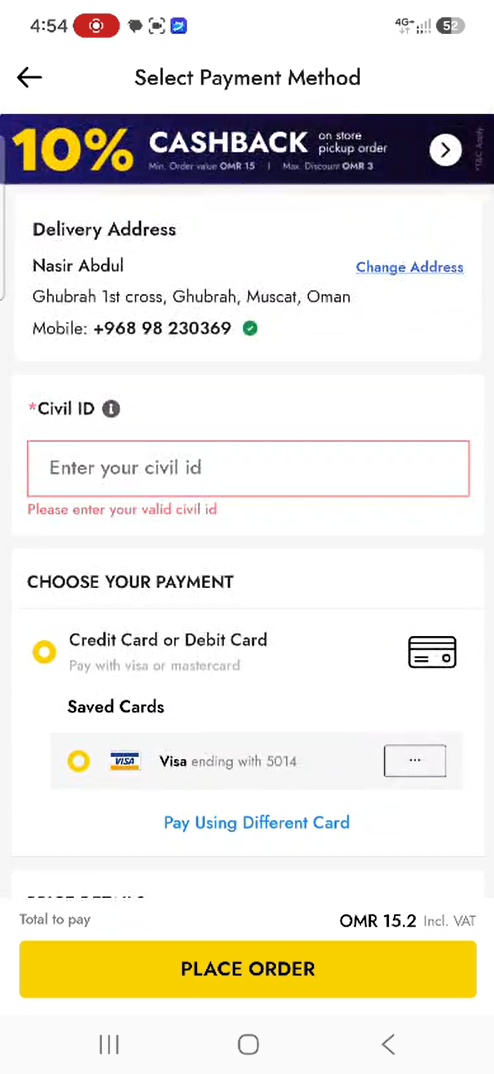
Customers may ask why their ID is required. Please explain that this is a mandatory requirement for Oman shipments due to customs and delivery regulations.
The ID is required for:
Oman Customs may require the recipient's identification details to process and clear imported e-commerce shipments.
Providing the correct ID helps avoid customs delays.
Courier partners may use the ID details to verify the recipient and ensure the shipment is delivered to the correct person.
The requirement supports Oman government and customs regulations for online shipments.
➡️ Enter the Civil ID / Civil Number mentioned on the National ID Card.
➡️ Enter the Resident Card Number (Resident ID) mentioned on their Resident Card.
Response:
"The Civil ID is required for Oman orders as part of customs clearance and delivery procedures. Providing the correct ID helps ensure your order is processed and delivered smoothly."
Response:
"Yes, the Civil ID/Resident ID is a mandatory field for Oman orders. Without this information, the order cannot be completed."
Response:
"We understand your concern. The ID information is required only for order processing, customs clearance, and delivery requirements as per Oman regulations. Without it, we won't be able to complete the order."
Response:
"If you are an expatriate resident in Oman, please enter your Resident Card Number (Resident ID)."
Advise the customer that:
If a customer confirms that they have entered the correct Civil ID/Resident ID but an error is still appearing, follow the below approach:
Inform the customer:
"The Civil ID entered during checkout is validated through an API connected with the relevant government/regulatory authority. This validation is not performed directly by Brands For Less."
If the customer is entering the correct ID and the validation is still failing:
"If the correct Civil ID is entered and the system is still showing an error, this usually means the validation has not been approved by the concerned regulatory authority. It is not a failure from the Brands For Less system."
Reassure the customer:
"We will still raise this with our IT team to verify that the validation request is being sent correctly from our side and check if there are any technical issues."
If our IT team confirms that the validation request is being sent successfully and the error continues:
"In this case, the customer will need to contact the relevant customs/regulatory authority with their Civil ID details for further verification."
Customer: "I entered my correct Civil ID, but I still cannot place the order."
Response:
We understand your concern. The Civil ID validation is connected through an API with the relevant government/regulatory authority and is not processed directly by Brands For Less. If the correct ID is entered and an error still appears, it may be due to a validation issue from the regulatory side.
We will raise this with our IT team to confirm that the request is being processed correctly from our side. If everything is working correctly from our end and the issue continues, you may need to check with the concerned authority for further verification of your Civil ID.