Faq ID : 108
25 May, 2026 16:48
Sachin K
FAQ Category
SLA & Process Guidelines
| Topic / Case |
Assign |
SLA |
| Cases missed SLA / regardless the country |
Urgent LMT |
24 Hours |
| Update Status |
Urgent LMT |
24 Hours |
| Expedite Delivery / UAE & KSA only |
Urgent LMT |
24 Hours |
| Cancel Order |
LMT |
72 Hours |
| Refund to Wallet - In Store |
— |
Immediately |
| Refund to Wallet - Home Pick-Up |
— |
3–5 Working Days |
| Refund to CC / Tabby / Tamara |
— |
7–14 Working Days |
| Complicated Cases |
L2 |
48 Hours |
| Return Pick-Up – All Countries |
— |
5 Working Days |
| Supervisor Call Back / Escalation |
— |
4 Hours |
| Any Sub-Ticket to LMT |
LMT |
72 Hours |
| Any Sub-Ticket to OMT |
OMT |
72 Hours |
| Return Window |
— |
14 Calendar Days |
| Return Window in Malaysia |
— |
30 Calendar Days |
| Return Window for Discounted Items |
— |
3 Calendar Days |
| IT Tickets |
— |
5 Calendar Days |
| Store Cancellation |
— |
Once reach the store |
|
Faq ID : 114
18 Sep, 2026 14:02
Sachin K
FAQ Category
Process for Obtaining ARN for Store Purchase Refunds
Please follow the process below whenever an ARN is required for a store purchase refund (this does not apply to online orders).
Process
The assigned CSA must raise a request to Annalynn (annalyn@bflgroup.ae) through Kapture and keep the following stakeholders in CC:
Mandatory Information
The request must include all of the below details. Requests with missing information will not be processed.
- Refund Amount
- Store where the return was processed
- Date & Time of the return
- Original Transaction Invoice Number or a copy of the purchase invoice
If the refund slip is available, it is highly recommended to attach it as well.
Important Note
A screenshot from Reciprocii is NOT sufficient to obtain the ARN.
The actual purchase invoice number is mandatory and should be obtained either:
- Directly from the customer, or
- Through WMS/Reciprocii.
Example Invoice Number: FS0XK0023511
Please ensure this process is followed for all ARN requests to avoid delays from the Finance team.
|
Faq ID : 118
18 Sep, 2026 14:02
Sachin K
FAQ Category
Motor City Flagship Store - Customer Vehicle Parking Policy
Parking at the Motor City Flagship Store is managed by Parkonic in partnership with Salik. Parking fees are automatically deducted from the vehicle owner's Salik account. Brands For Less does not collect or process parking payments.
1. Parking Charges
-
The first 15 minutes of parking are free.
-
Thereafter, parking is charged at AED 10 per hour or part thereof.
-
Parking charges are automatically deducted from the registered Salik account linked to the vehicle.
2. Complimentary Parking Validation
Customers shopping at the Brands For Less Motor City Flagship Store are eligible for up to 2 hours of complimentary parking, subject to the following conditions:
-
A valid purchase invoice from the Brands For Less Motor City Flagship Store must be presented.
-
The vehicle's license plate number must be validated in-store using the purchase invoice.
-
Validation provides up to 2 hours of free parking for the eligible visit.
3. Cooling-Off Period
To ensure fair usage of the complimentary parking benefit:
-
After a complimentary parking validation has been utilized, a cooling-off period of 1 hour applies.
-
During this 1-hour cooling-off period, customers are not eligible for another complimentary parking validation.
-
Once the cooling-off period has elapsed, customers may receive another 2-hour complimentary parking validation only upon making a new eligible purchase and validating their vehicle again.
4. Important Notes
-
Complimentary parking is available only for customers with a valid purchase invoice from the Motor City Flagship Store.
-
Each validation is linked to the vehicle's license plate and cannot be transferred.
-
Failure to validate the vehicle before leaving the store will result in the applicable parking charges being deducted from the customer's Salik account.
-
Parking validation cannot be applied retrospectively once the parking session has ended.
-
Parking availability is subject to capacity.
5. Customer Support
For assistance regarding:
-
Parking charges, deductions, or technical parking issues, customers should contact Parkonic Customer Support.
-
Purchase invoice validation, customers may approach any Brands For Less store associate or Customer Service desk before leaving the store.
Frequently Asked Questions (FAQs)
Q. Is parking free?
-
The first 15 minutes are free. Customers with a valid Brands For Less purchase can receive up to 2 hours of complimentary parking after validation.
Q. How do I get free parking?
-
Make a purchase at the Motor City Flagship Store and have your vehicle's license plate validated in-store using your purchase invoice.
Q. Where is the parking fee deducted from?
-
Parking fees are automatically deducted from the registered Salik account associated with the vehicle.
Q. Can I validate parking without making a purchase?
-
No. Complimentary parking validation is available only with a valid purchase invoice.
Q. If I forget to validate my parking and the amount is deducted, can I get it reimbursed later?
No. Parking validation must be completed before leaving the parking facility. Once your vehicle has exited and the parking fee has been deducted from your Salik account, the parking session is considered closed. Unfortunately, parking cannot be validated retrospectively, and reimbursements cannot be processed.
Q. Can I get another free 2-hour parking validation immediately after my first one?
-
No. A 1-hour cooling-off period applies. After this period, a new eligible purchase is required to receive another complimentary parking validation.
|
Faq ID : 115
16 Jul, 2026 12:01
Sachin K
FAQ Category
Process for Obtaining ARN for Store Purchase Refunds
Please follow the process below whenever an ARN is required for a store purchase refund (this does not apply to online orders).
Process
The assigned CSA must raise a request to Annalynn (annalyn@bflgroup.ae) through Kapture and keep the following stakeholders in CC:
Mandatory Information
The request must include all of the below details. Requests with missing information will not be processed.
- Refund Amount
- Store where the return was processed
- Date & Time of the return
- Original Transaction Invoice Number or a copy of the purchase invoice
If the refund slip is available, it is highly recommended to attach it as well.
Important Note
A screenshot from Reciprocii is NOT sufficient to obtain the ARN.
The actual purchase invoice number is mandatory and should be obtained either:
- Directly from the customer, or
- Through WMS/Reciprocii.
Example Invoice Number: FS0XK0023511
Please ensure this process is followed for all ARN requests to avoid delays from the Finance team.
|
Faq ID : 110
09 Jun, 2026 16:10
Sachin K
FAQ Category
Why is my Voucher or Coupon Not Working?
Answer: If a customer contacts us stating that a voucher is not working, it is important to first gather all relevant information before proceeding with any investigation or escalation. This helps verify the voucher's eligibility, validity period, usage conditions, and any technical issues that may be preventing redemption.
Before investigating the issue, request the following:
-
Screenshot or image of the voucher or the email/SMS containing the voucher.
-
Voucher details, including:
-
How the voucher was received (promotion, compensation, campaign, loyalty reward, etc.)
-
Voucher value
-
Country of issuance
-
Expiry date
-
Maximum discount/value (if applicable)
-
Screenshot of the error message received when attempting to apply the voucher.
Spiel : Thank you for sharing the details 💛 Upon checking, we found that the voucher expired on [DATE]. As vouchers are issued with a specific validity period and are intended to be used within that timeframe, we are unfortunately unable to reissue or extend vouchers that have been expired. We completely understand this may not be the outcome you were hoping for. The validity period is communicated at the time of issuance to ensure fair and consistent application of the offer for all customers. We truly appreciate your understanding
P.S. (Internal, not to be disclosed to customer): If the voucher was expired over 10 days from the date of contacting, no exception or re-issue can be provided
Escalate only if:
-
The voucher is within its validity period.
-
The voucher appears valid but is generating an unexpected error.
-
There is a suspected system issue affecting voucher redemption.
-
The voucher terms and conditions appear to have been met, but the discount is not being applied correctly.
- Any rationally standing, convincing, and justifiable reason (CSA is responsible for this failing, for which do not raise a ticket for exception). Not simply because the customer is angry
|
Faq ID : 107
01 May, 2026 18:27
Sachin K
FAQ Category
Why :
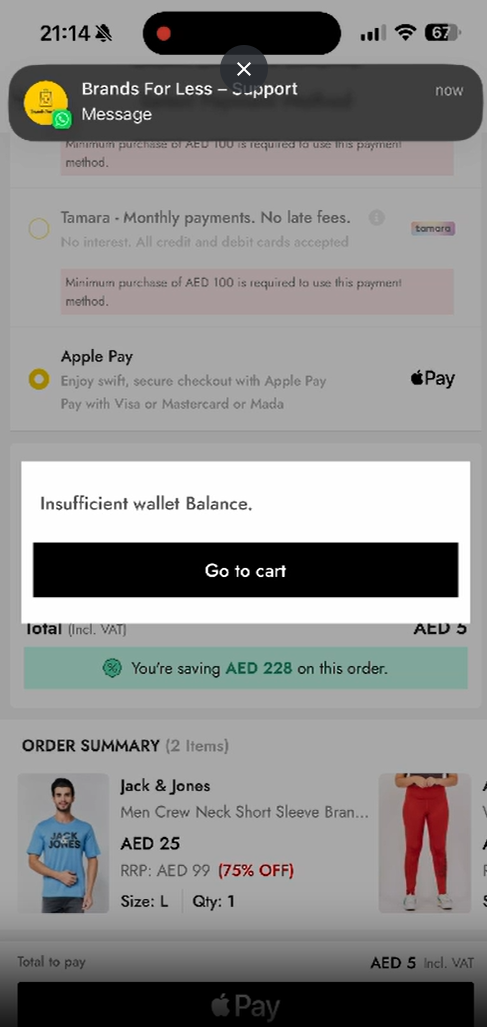
To ensure the highest level of security and protect customer wallet from unauthorised access, automated bot activity, or system malfunctions, our platform employs a real-time transaction safeguard.
If a transaction using wallet balance is unsuccessful, our security protocol may temporarily "lock" the customer's wallet amount. This is a protective measure to ensure your funds are not double-spent or accessed during a system sync. This temporary hold is usually released automatically within 1 hour.
Agent Action:
Ask the customer to wait up to 1 hour for the balance to be released without any further attempts.
Then advise them to try again. If the customer wants to complete the order immediately, use any other payment methods without wallet as other payment methods works fine.
Escalation:
If the issue continues after 1 hour → create Subticket to L2 with screen recording.
Customer Script:
I’m really sorry for the inconvenience you’re facing. I understand how frustrating this can be. I want to reassure you that your funds are completely safe. It looks like your wallet balance is temporarily blocked due to a previous unsuccessful transaction, in order to safeguard against any unauthorised access or malfunctions. This should be automatically resolved within 1 hour. Please try again after that time, and if the issue is not resolved, please follow up with us, and we’ll be happy to assist you further.
|
Faq ID : 104
16 Apr, 2026 17:30
Sachin K
FAQ Category
When a customer returns an item and requests a refund to their card for a purchase made through instalment services (viz.Tabby or Tamara), please adhere to the following workflow:
Refund Routing: Once the refund is completed from our side, the funds are automatically directed to TABBY or Tamara (depending on the service used by the customer), not directly to the customer's bank card. Once we process the refund from our side, the timeline depends on TABBY or Tamara’s internal processing. We recommend reaching out to them for exact timelines.
Customer Action: The customer must contact the respective customer care team (TABBY or Tamara) directly to follow up on the status of their refund and its reflection in their account. Once the refund is processed, we are unable to track it further, as it is handled by TABBY or Tamara. If the refund is claimed to be not received by any of these vendors (Tabby or Tamara), the customer need to contact them via email and get an email confirmation from these vendors (viz.Tabby or Tamara) that no refund was received from Brands For Less for the respective return/amount. Only with this email from Tabby / Tamara, our finance team / Order Management Team can raise any dispute or enquiry with the vendor for such a missing refund
Reference Details: Please be aware that we do not have ARNs (Acquirer Reference Numbers) available for TABBY or Tamara refunds. Kindly ensure this information is communicated clearly to customers to manage their expectations and guide them toward the correct support channels.
|
Faq ID : 103
16 Apr, 2026 17:02
Sachin K
FAQ Category
Brands For Less operates physical (brick-and-mortar) stores across the UAE, KSA (Saudi Arabia), Qatar, Oman, Kuwait, Bahrain, and Malaysia.
Brands For Less has 120+ physical active stores across the abouve countries
In addition to these retail locations, customers can conveniently shop Brands For Less products online through our website and mobile app. Our online presence covers all the above countries, with additional availability in Lebanon, Singapore, and India.
Below is the complete list of stores in each country, their respective Area Managers and the store Email Address
UAE :
| SR. # |
STORE NAME |
Area Manager Responsible
|
AM Email Adress |
Store Email ID |
Region |
| 1 |
BFL DXB Dubai Mall |
ALI IBRAHIM |
ali.i@bflgroup.ae |
bfldubaimall@bflgroup.ae |
Dubai |
| 2 |
BFL DXB Dubai Festival City |
ALI IBRAHIM |
ali.i@bflgroup.ae |
bfldfc@bflgroup.ae |
Dubai |
| 3 |
BFL DXB Shopping center |
ALI IBRAHIM |
ali.i@bflgroup.ae |
lfldfc@bflgroup.ae |
Dubai |
| 4 |
LFL DXB Dubai Festival City |
ALI IBRAHIM |
ali.i@bflgroup.ae |
bfldfc@bflgroup.ae |
Dubai |
| 5 |
BFL DXB Dubai Marina Mall |
ALI IBRAHIM |
ali.i@bflgroup.ae |
bflmarina@bflgroup.ae |
Dubai |
| 6 |
BFL DXB JBR |
ALI IBRAHIM |
ali.i@bflgroup.ae |
bfljbr@bflgroup.ae |
Dubai |
| 7 |
BFL DXB DAMAC HILLS |
ALI IBRAHIM |
ali.i@bflgroup.ae |
bfldamac@bflgroup.ae |
Dubai |
| 8 |
LFL DXB Shopping center |
ALI IBRAHIM |
ali.i@bflgroup.ae |
lfldfc@bflgroup.ae |
Dubai |
| 9 |
BFL DXB Circle Mall |
CHARIE |
charie.epil@bflgroup.ae |
bflcirclemall@bflgroup.ae |
Dubai |
| 10 |
BFL DXB Ghazal Mall |
CHARIE |
charie.epil@bflgroup.ae |
GHAZAL@bflgroup.ae |
Dubai |
| 11 |
BFL DXB Oasis Mall |
CHARIE |
charie.epil@bflgroup.ae |
bfloasis@bflgroup.ae |
Dubai |
| 12 |
BFL DXB Springs Souk |
CHARIE |
charie.epil@bflgroup.ae |
bflsprings@bflgroup.ae |
Dubai |
| 13 |
BFL Al Ain Mall |
CHARIE |
charie.epil@bflgroup.ae |
bflalain@bflgroup.ae |
Al Ain |
| 14 |
BFL DXB Technopark Extension
|
CHARIE |
charie.epil@bflgroup.ae |
technostore@bflgroup.ae |
Dubai |
| 15 |
BFL DXB Shindagha City Center
|
CHARIE |
charie.epil@bflgroup.ae |
bflshindagha@bflgroup.ae |
Dubai |
| 16 |
BFL DXB Burjuman Mall 2 |
JOY |
gjoy@bflgroup.ae |
burjuman@bflgroup.ae |
Dubai |
| 17 |
BFL AJM Ajman Boulevard |
JOY |
gjoy@bflgroup.ae |
bflajman@bflgroup.ae |
AJMAN |
| 18 |
BFL AJM Ajman City Center |
JOY |
gjoy@bflgroup.ae |
bflacc@bflgroup.ae |
AJMAN |
| 19 |
BFL RAK Al Dhait |
JOY |
gjoy@bflgroup.ae |
bflrak@bflgroup.ae |
RAK |
| 20 |
BFL Rak Manar |
JOY |
gjoy@bflgroup.ae |
bflrakmanar@bflgroup.ae |
RAK |
| 21 |
BFL SHJ Al Khan |
JOY |
gjoy@bflgroup.ae |
alkhan@bflgroup.ae |
SHARJAH |
| 22 |
BFL SHJ Sharjah City Centre |
JOY |
gjoy@bflgroup.ae |
scc@bflgroup.ae |
SHARJAH |
| 23 |
BFL SHJ Sharjah Central |
JOY |
gjoy@bflgroup.ae |
bflshjcentral@bflgroup.ae |
SHARJAH |
| 24 |
BFL SHJ Yasmeen |
JOY |
gjoy@bflgroup.ae |
yasmeen@bflgroup.ae |
SHARJAH |
| 25 |
BFL AUH Alwahda Mall |
MOHAMAD. A |
mohamad.abbas@bflgroup.ae |
wmall@bflgroup.ae |
Abudhabi |
| 26 |
BFL AUH Abudhabi Mall |
MOHAMAD. A |
mohamad.abbas@bflgroup.ae |
abumall@bflgroup.ae |
Abudhabi |
| 27 |
BFL AUH Yas Mall |
MOHAMAD. A |
mohamad.abbas@bflgroup.ae |
bflyasmall@bflgroup.ae |
Abudhabi |
| 28 |
BFL AUH WTC Mall |
MOHAMAD. A |
mohamad.abbas@bflgroup.ae |
bflwtc@bflgroup.ae |
Abudhabi |
| 29 |
BFL AUH Khalidiya mall |
MOHAMAD. A |
mohamad.abbas@bflgroup.ae |
khalidia@bflgroup.ae |
Abudhabi |
| 30 |
BFL AUH Mushrif mall |
MOHAMAD. A |
mohamad.abbas@bflgroup.ae |
bflmushrif@bflgroup.ae |
Abudhabi |
| 31 |
BFL AUH Reem Mall |
MOHAMAD. A |
mohamad.abbas@bflgroup.ae |
bflreem@bflgroup.ae |
Abudhabi |
| 32 |
BFL AUH Forsan Mall |
MOHAMAD. A |
mohamad.abbas@bflgroup.ae |
bflforsan@bflgroup.ae |
Abudhabi |
| 33 |
BFL AUH Dalma Mall |
MOHAMAD. A |
mohamad.abbas@bflgroup.ae |
bfldalma@bflgroup.ae |
Abudhabi |
| 34 |
BFL AUH Hamdan |
MOHAMAD. A |
mohamad.abbas@bflgroup.ae |
hamdan@bflgroup.ae |
Abudhabi |
| 35 |
BFL AUH BAS Mall |
MOHAMAD. A |
mohamad.abbas@bflgroup.ae |
bflbasmall@bflgroup.ae |
Abudhabi |
| 36 |
BFL DXB Dubai Outlet Mall |
ROWENA |
rowena.m@bflgroup.ae |
dom@bflgroup.ae |
Dubai |
| 37 |
BFL DXB Deira City Center |
ROWENA |
rowena.m@bflgroup.ae |
bfldcc@bflgroup.ae |
Dubai |
| 38 |
BFL DXB Silicon Central |
ROWENA |
rowena.m@bflgroup.ae |
bflsilicon@bflgroup.ae |
Dubai |
| 39 |
BFL DXB Uptown Mall |
ROWENA |
rowena.m@bflgroup.ae |
bfluptown@bflgroup.ae |
Dubai |
| 40 |
BFL DXB Arabian Centre |
ROWENA |
rowena.m@bflgroup.ae |
arabiancenter@bflgroup.ae |
Dubai |
| 41 |
BFL DXB Oud Metha |
ROWENA |
rowena.m@bflgroup.ae |
metha@bflgroup.ae |
Dubai |
| 42 |
BFL DXB Ghurair Mall |
ROWENA |
rowena.m@bflgroup.ae |
bflghurair@bflgroup.ae |
Dubai |
| 43 |
BFL DXB Reef Mall |
ROWENA |
rowena.m@bflgroup.ae |
bflreef@bflgroup.ae |
Dubai |
| 44 |
BFL FUJ Fujairah Mall |
ROWENA |
rowena.m@bflgroup.ae |
bflfujairah@bflgroup.ae |
Fujairah |
| 45 |
BFL DXB Umm Suqeim |
TANIOS |
tanios.e@bflgroup.ae |
suqeim@bflgroup.ae |
Dubai |
| 46 |
BFL DXB Al Barsha |
TANIOS |
tanios.e@bflgroup.ae |
BFLBARSHA@bflgroup.ae |
Dubai |
| 47 |
BFL DXB Ibn Battuta Mall |
TANIOS |
tanios.e@bflgroup.ae |
IBN@bflgroup.ae |
Dubai |
| 48 |
BFL DXB Ibn Battuta Metrolink
|
TANIOS |
tanios.e@bflgroup.ae |
metrolink@bflgroup.ae |
Dubai |
| 49 |
BFL SHJ Mega Mall |
TANIOS |
tanios.e@bflgroup.ae |
bflmegamall@bflgroup.ae |
SHARJAH |
| 50 |
HFL DXB Nakheel Mall |
TANIOS |
tanios.e@bflgroup.ae |
hflnakheel@bflgroup.ae |
Dubai |
| 51 |
BFL DXB Nakheel Mall |
TANIOS |
tanios.e@bflgroup.ae |
bflnakheel@bflgroup.ae |
Dubai |
| 52 |
BFL SHJ Sahara Centre 2 |
TANIOS |
tanios.e@bflgroup.ae |
bflsahara@bflgroup.ae |
SHARJAH |
| 53 |
TFL DXB Al Barsha |
TANIOS |
tanios.e@bflgroup.ae |
tflbarsha@bflgroup.ae |
Dubai |
KSA :
| SR. # |
STORE NAME |
Area Manager Responsible
|
AM Email Adress |
Store Email ID |
Region |
| 1 |
BFL DMM AMWAJ MALL |
Alaa Mlli |
alaa.mlli@bflgroup.ae |
dm-amwaj@bflgroup.ae |
DAMMAM |
| 2 |
BFL DMM RUWAQ |
Alaa Mlli |
alaa.mlli@bflgroup.ae |
bflruwaq@bflgroup.ae |
DAMMAM |
| 3 |
BFL DMM OTHAIM MALL |
Alaa Mlli |
alaa.mlli@bflgroup.ae |
othaimmall@bflgroup.ae |
DAMMAM |
| 4 |
BFL DMM DAREEN MALL |
Alaa Mlli |
alaa.mlli@bflgroup.ae |
dm-dareen@bflgroup.ae |
DAMMAM |
| 5 |
BFL DMM AL SHATEA MALL
|
Alaa Mlli |
alaa.mlli@bflgroup.ae |
dm-shatea@bflgroup.ae |
DAMMAM |
| 6 |
BFL JUBAIL BALAD |
Alaa Mlli |
alaa.mlli@bflgroup.ae |
dm-jubailbalad@bflgroup.ae |
DAMMAM |
| 7 |
BFL RYD GRANADA MALL |
Mahmoud Zaarour |
mahmoud@bflgroup.ae |
ryd-granada@bflgroup.ae |
RIYADH |
| 8 |
BFL RYD LOCALIZER MALL
|
Mahmoud Zaarour |
mahmoud@bflgroup.ae |
ryd-localizer@bflgroup.ae |
RIYADH |
| 9 |
BFL RYD ALIA PLAZA |
Mahmoud Zaarour |
mahmoud@bflgroup.ae |
ryd-aliat@bflgroup.ae |
RIYADH |
| 10 |
BFL RYD RIYAD PARK MALL
|
Mahmoud Zaarour |
mahmoud@bflgroup.ae |
ryd-riyadhpark@bflgroup.ae |
RIYADH |
| 11 |
BFL RYD OLAYA MALL |
Mahmoud Zaarour |
mahmoud@bflgroup.ae |
ryd-olaya@bflgroup.ae |
RIYADH |
| 12 |
BFL RYD RIYADH GALLERY MALL |
Mahmoud Zaarour |
mahmoud@bflgroup.ae |
bflrydgallery@bflgroup.ae |
RIYADH |
| 13 |
BFL RYD VIEW MALL |
Mahmoud Zaarour |
mahmoud@bflgroup.ae |
ryd-viewmall@bflgroup.ae |
RIYADH |
| 14 |
BFL RYD KING ABDULLAH |
Mahmoud Zaarour |
mahmoud@bflgroup.ae |
rydkingabdullah@bflgroup.ae |
RIYADH |
| 15 |
BFL RYD HAYAT MALL |
Mahmoud Zaarour |
mahmoud@bflgroup.ae |
bflrydhayat@bflgroup.ae |
RIYADH |
| 16 |
BFL RYD NAKHEEL |
Mahmoud Zaarour |
mahmoud@bflgroup.ae |
bflnakheel@bflgroup.ae |
RIYADH |
| 17 |
BFL RYD QASR MALL |
Mahmoud Zaarour |
mahmoud@bflgroup.ae |
ryd-qasr@bflgroup.ae |
RIYADH |
| 18 |
BFL RYD SAHARA MALL |
Mahmoud Zaarour |
mahmoud@bflgroup.ae |
ryd-sahara@bflgroup.ae |
RIYADH |
| 19 |
BFL RYD BOULEVARD |
Mahmoud Zaarour |
mahmoud@bflgroup.ae |
rydrydboulevard@bflgroup.ae |
RIYADH |
| 20 |
BFL JED RED SEA MALL |
Mohamed Samir |
mohamed.samir@bflgroup.ae |
jed-redsea@bflgroup.ae |
JEDDAH |
| 21 |
BFL JED ARAB MALL |
Mohamed Samir |
mohamed.samir@bflgroup.ae |
jed-arabmall@bflgroup.ae |
JEDDAH |
| 22 |
BFL JED UWALK |
Mohamed Samir |
mohamed.samir@bflgroup.ae |
bfljeduwalk@bflgroup.ae |
JEDDAH |
| 23 |
BFL JED VILLAGE MALL |
Mohamed Samir |
mohamed.samir@bflgroup.ae |
jed-village@bflgroup.ae |
JEDDAH |
| 24 |
BFL JED YASMEEN |
Mohamed Samir |
mohamed.samir@bflgroup.ae |
bfljedyasmeen@bflgroup.ae |
JEDDAH |
| 25 |
BFL JED AZIZ MALL |
Mohamed Samir |
mohamed.samir@bflgroup.ae |
jed-azizmall@bflgroup.ae |
JEDDAH |
| 26 |
BFL MADINA NOOR |
Muhammad Faisal Nadeem
|
muhammad.nadeem@bflgroup.ae |
bflnoormall@bflgroup.ae |
MADINAH |
| 27 |
BFL MAK SOUK AL AWALI |
Muhammad Faisal Nadeem
|
muhammad.nadeem@bflgroup.ae |
bflnoormall@bflgroup.ae |
MECCA |
| 28 |
BFL TABUK PARK |
Muhammad Faisal Nadeem
|
muhammad.nadeem@bflgroup.ae |
bfltabuk@bflgroup.ae |
MECCA |
| 29 |
BFL MAK MAYAN YARD |
Muhammad Faisal Nadeem
|
muhammad.nadeem@bflgroup.ae |
mec-mayan@bflgroup.ae |
MECCA |
| 30 |
BFL MDNA MANAR MALL |
Muhammad Faisal Nadeem
|
muhammad.nadeem@bflgroup.ae |
mdn-manar@bflgroup.ae |
MADINAH |
| 31 |
BFL JED SOLIDAIRE |
Omar Al Basisi |
omar.albasisi@bflgroup.ae |
bfljedsolidaire@bflgroup.ae |
JEDDAH |
| 32 |
BFL JED JEDDAH PARK MALL
|
Omar Al Basisi |
omar.albasisi@bflgroup.ae |
jed-jeddahpark@bflgroup.ae |
JEDDAH |
| 33 |
BFL JED ANDALUS MALL |
Omar Al Basisi |
omar.albasisi@bflgroup.ae |
jed-andalus@bflgroup.ae |
JEDDAH |
| 34 |
BFL JED SOUK 7 |
Omar Al Basisi |
omar.albasisi@bflgroup.ae |
Jed-Souq7@bflgroup.ae |
JEDDAH |
| 35 |
BFL JED SALAM MALL |
Omar Al Basisi |
omar.albasisi@bflgroup.ae |
jed-salam@bflgroup.ae |
JEDDAH |
| 36 |
BFL RYD KHURAIS |
Turki Al Mayouf |
turki.almayouf@bflgroup.ae |
bflkhurais@bflgroup.ae |
RIYADH |
| 37 |
BFL RYD PARK AVENUE |
Turki Al Mayouf |
turki.almayouf@bflgroup.ae |
ryd-parkavenue@bflgroup.ae |
RIYADH |
| 38 |
BFL RYD IBDAA PLAZA |
Turki Al Mayouf |
turki.almayouf@bflgroup.ae |
ryd-ibdaa@bflgroup.ae |
RIYADH |
| 39 |
BFL RYD HAMRA MALL |
Turki Al Mayouf |
turki.almayouf@bflgroup.ae |
ryd-hamra@bflgroup.ae |
RIYADH |
| 40 |
BFL RYD TALA MALL |
Turki Al Mayouf |
turki.almayouf@bflgroup.ae |
ryd-talamall@bflgroup.ae |
RIYADH |
| 41 |
BFL RYD OTHAIM MALL |
Turki Al Mayouf |
turki.almayouf@bflgroup.ae |
othaimmall@bflgroup.ae |
RIYADH |
| 42 |
BFL RYD KHARJ ZONE |
Turki Al Mayouf |
turki.almayouf@bflgroup.ae |
ryd-alkharj@bflgroup.ae |
RIYADH |
| 43 |
BFL RYD OTHAIM KHURAIS
|
Turki Al Mayouf |
turki.almayouf@bflgroup.ae |
ryd-othaimkhurais@bflgroup.ae |
RIYADH |
Qatar
| SR. # |
STORE NAME |
Area Manager Responsible
|
AM Email Adress |
Store Email ID |
Region |
| 1 |
BFL ALSADD |
Mahmoud Khleif |
m.khleif@bflgroup.ae |
bflalsadd@bflgroup.ae |
DOHA |
| 2 |
BFL DOHAMALL |
Mahmoud Khleif |
m.khleif@bflgroup.ae |
bfldohamall@bflgroup.ae |
DOHA |
| 3 |
BFL Ezdan |
Mahmoud Khleif |
m.khleif@bflgroup.ae |
bflezdan@bflgroup.ae |
DOHA |
| 4 |
BFL Hayat Plaza |
Mahmoud Khleif |
m.khleif@bflgroup.ae |
bflhayatplaza@bflgroup.ae |
DOHA |
| 5 |
BFL Mall of Qatar |
Mahmoud Khleif |
m.khleif@bflgroup.ae |
bflmoq@bflgroup.ae |
DOHA |
| 6 |
BFL ALSADD QAMRA |
Mahmoud Khleif |
m.khleif@bflgroup.ae |
bflalsaddqamra@bflgroup.ae |
DOHA |
| 7 |
Doha City Center |
Mahmoud Khleif |
m.khleif@bflgroup.ae |
dohacc@bflgroup.ae |
DOHA |
| 8 |
Vendome Mall |
Mahmoud Khleif |
m.khleif@bflgroup.ae |
bflvendome@bflgroup.ae |
DOHA |
Oman
| SR. # |
STORE NAME |
Area Manager Responsible
|
AM Email Adress |
Store Email ID |
Region |
| 1 |
BFL ALKHOUD |
Mohamed Sanaad Mohamed Shareef |
mohamed.shareef@bflgroup.ae |
bfl_khdmct@bflgroup.ae |
MUSCAT |
| 2 |
BFL AVENUE MALL MUSCAT |
Mohamed Sanaad Mohamed Shareef |
mohamed.shareef@bflgroup.ae |
bfl_oammct@bflgroup.ae |
MUSCAT |
| 3 |
BFL Muscat CC |
Mohamed Sanaad Mohamed Shareef |
mohamed.shareef@bflgroup.ae |
bflmuscatcc@bflgroup.ae |
MUSCAT |
| 4 |
BFL OMAN MALL |
Mohamed Sanaad Mohamed Shareef |
mohamed.shareef@bflgroup.ae |
bfl_moomct@bflgroup.ae |
MUSCAT |
| 5 |
BFL SOHAR CC |
Mohamed Sanaad Mohamed Shareef |
mohamed.shareef@bflgroup.ae |
bflsoharcc@bflgroup.ae |
SOHAR |
| 6 |
BFL BAHJA |
Mohamed Sanaad Mohamed Shareef |
mohamed.shareef@bflgroup.ae |
bfl_mabmct@bflgroup.ae |
SOHAR |
Kuwait
| SR. # |
STORE NAME |
Area Manager Responsible
|
AM Email Adress |
Store Email ID |
Region |
| 1 |
BFL Hawali |
Elias Eid |
elias@bflgroup.ae |
bflhawali@bflgroup.ae |
Kuwait |
| 2 |
BFL Kuwait - Salmiya |
Elias Eid |
elias@bflgroup.ae |
bfl_salkwt@bflgroup.ae |
Kuwait |
| 3 |
BFL Shuweikh |
Elias Eid |
elias@bflgroup.ae |
bflshuweikh@bflgroup.ae |
Kuwait |
| 4 |
Kuwait Albidaa Mall |
Elias Eid |
elias@bflgroup.ae |
kw-bidaa@bflgroup.ae |
Kuwait |
| 5 |
Kuwait LFL Khiran |
Elias Eid |
elias@bflgroup.ae |
kw-lflkhiran@bflgroup.ae |
Kuwait |
| 6 |
Kuwait AL Rai |
Elias Eid |
elias@bflgroup.ae |
kw-alrai@bflgroup.ae |
Kuwait |
| 7 |
Muy Mucho Khiran |
Elias Eid |
elias@bflgroup.ae |
muymuchokhiran@bflgroup.ae |
Kuwait |
| 8 |
Sama Mall - Kuwait |
Elias Eid |
elias@bflgroup.ae |
kw-sama@bflgroup.ae |
Kuwait |
Bahrain
Malaysia
| SR. # |
STORE NAME |
Area Manager Responsible
|
AM Email Adress |
Store Email ID |
Region |
| 1 |
BFL Pyramid |
Vinod Kumar |
vinod@bflgroup.ae |
bflpyramid@bflgroup.ae |
Selangor |
| 2 |
velocity mall |
Vinod Kumar |
vinod@bflgroup.ae |
bflvelocity@bflgroup.ae |
Kuala Lumpur |
|
Faq ID : 101
06 Apr, 2026 20:10
Sachin K
FAQ Category
1. Is VAT Refund available at Brands For Less?
-
UAE & KSA:
VAT Refund is available only at stores registered under the official Tax-Free Scheme.
-
Other Regions:
Availability is not standardized. Customers must confirm with the specific store they plan to visit.
2. What should the CSA do when a customer asks about Tax Refund availability?
Mandatory Steps:
-
Do NOT assume availability
-
Check with the specific store the customer intends to visit
-
Use Microsoft Teams to connect with store staff
-
Confirm if the store is:
-
Registered for Tax Refund
-
Actively issuing Tax-Free forms
Post Verification:
-
Call back the customer with confirmed information
-
Ensure closure of the query only after callback
Important:
Callback is mandatory — no open-ended responses
3. What should CSAs inform customers about the VAT Refund process?
If the store is confirmed as Tax-Free registered, share the below process to the customer:
Standard Process :
-
Shop at Participating Store
-
Customer must ensure the store is part of the Tax-Free scheme
-
Request Tax-Free Form at Purchase
-
Minimum Spend (KSA Specific)
-
Minimum: SAR/AED 500 (or any currency)
-
Same-day receipts from same retailer can be combined
-
Airport Verification (Before Check-in)
-
Visit Tax Refund kiosk / counter (e.g., Global Blue, Green Planet etc.)
-
Scan & Validate
-
Passport + Tax-Free documents
-
Items must be unused and available for inspection
-
Refund Collection
-
Via card or cash (as per country customs and vendor policy)
4. Important Guidelines to Communicate
CSAs must clearly inform customers:
-
Refund is handled by third-party operators, not Brands For Less. Any complaints of refund shall be raised to the authority
-
Items may be physically inspected at the airport
-
Refund timelines depend on the provider
-
Cash refund limits apply (ask customer to check it in the respective countries customs portal)
-
Some terminals may have cash refund restrictions
5. What if the customer is traveling from other countries?
-
Inform the customer that:
-
They must confirm Tax Refund availability at the specific store
-
If confirmed, same process applies
CSA Responsibility:
-
Offer to check with the store
-
Ensure callback after verification
|
Faq ID : 96
18 Feb, 2026 14:54
Sachin K
FAQ Category
Sachin K
18 Feb, 2026 14:54
For Expedited Delivery Requests
When a customer contacts us requesting to expedite their order and the promised delivery date has not yet been reached, CSAs should inform the customer that we can raise an expedite request on their behalf. However, it must be clearly communicated that this is not a guarantee of faster delivery, as it depends on multiple operational factors such as courier availability, delivery bandwidth, and serviceability of the delivery area.
If the customer has placed order to the store or pickup point, inform the customer that a faster delivery would be available if the customer chooses home delivery and expediting a store / collection point order is not possible as the same is transferred in batches along with multiple packages.
In parallel, customers should be educated about the Express Delivery option, which is available only for Dubai orders & Kuwait & Qatar (tentatively starting Feb end 2026) and must be selected at the time of placing the order.
CSA Spiel (Added in Canned Response)
Thank you for reaching out. I will go ahead and raise an expedite request for your order from our end. Please note that while we’ll do our best, expedited delivery cannot be guaranteed as it depends on factors such as courier availability, delivery bandwidth, and your delivery location. For future orders within Dubai, you may also choose our Express Delivery option at checkout, which allows for same-day or next-day delivery based on the time the order is placed.
|
Faq ID : 92
12 Dec, 2025 15:02
Sachin K
FAQ Category
Q: What is required from the customer if the order status is “Under Customs Clearance”?
A: The courier may have requested customer documents.
Customer must submit:
|
Faq ID : 84
12 Dec, 2025 15:00
Sachin K
FAQ Category
Q : Customer wants to cancel an order that has already reached the store or on it's way to the store
A: The store cannot cancel the order directly. They can only return the item back (RTO – Return to Origin).
Once the store initiates RTO and the item returns, the refund will be processed within 3 business days.
If the refund needs to be processed immediately, CSA shall create the ticket to OMT asking for an immediate refund.
|
Faq ID : 85
12 Dec, 2025 15:00
Sachin K
FAQ Category
Can the customer cancel only one item from the order after it has been handed to the store?
A: No, partial cancellation is not possible at this stage.
However, the customer may:
|
Faq ID : 86
12 Dec, 2025 15:00
Sachin K
FAQ Category
Q: Customer receives “Mobile number already exists in another account.” What should they do?
A: This means the number is linked to another account of the customer. They have two options:
Option 1: Access the existing account
-
Enter the potential email ID which may have used for creating the account (the usual or most used email IDs of the customer)
-
If the account exist, customer can Reset password using the email linked to the account
-
During login, the app will send password reset link the email entered and customer can set new password and access
Option 2: Create/login with new email
|
Faq ID : 87
12 Dec, 2025 15:00
Sachin K
FAQ Category
Q: While placing an order, customer is asked to enter a “OTP.” Why?
A: This is not from BFL.
It is from the customer’s bank, and can be:
|
Faq ID : 88
12 Dec, 2025 15:00
Sachin K
FAQ Category
Why does the customer see “Too many verification attempts"
A: This appears when the customer tries to use:
Please ask the customer to wait for an hour and try again
|
Faq ID : 90
12 Dec, 2025 15:00
Sachin K
FAQ Category
Customer placing an order worth above 200SAR did not see free delivery. Why?
A.
-
Free delivery is applicable for local KSA orders above 200 SAR
-
If the order includes Global items (shipped from UAE), a global shipping fee will always apply regardless of order total. This fee goes to the courier and is unavoidable.
|
Faq ID : 91
12 Dec, 2025 15:00
Sachin K
FAQ Category
Q: Can non-returnable items be returned if the size is wrong but unused?
A:
Not normally. This is a rare and extreme exception, not standard practice.
Explain kindly that:
If an exception is granted:
-
Only store return is allowed
-
Store must perform a full inspection before accepting the item
-
CSA must email the store instructing them to inspect thoroughly
|
Faq ID : 83
12 Dec, 2025 14:43
Sachin K
FAQ Category
Does the customer receive a notification when their order arrives at the store?
A: Yes. When the item reaches the store, the customer receives an SMS notification.
If a customer claims they did not receive any notification and the app did not update, trigger the SMS OTP from Panel

|
Faq ID : 81
26 Nov, 2025 12:40
Sachin K
FAQ Category
Can we stop sending marketing emails & WhatsApp messages to a customer upon request?
Short Answer:
No — we cannot manually stop sending emails or WhatsApp messages from our side. Customers can unsubscribe directly from their own email inbox or WhatsApp.
Detailed Answer:
If a customer requests that we stop sending emails, kindly inform them that:
-
We cannot disable email notifications from our end.
-
Customers have full control and can unsubscribe from our emails directly through their mailbox (e.g., Gmail, Outlook, Yahoo).
-
They simply need to click “Unsubscribe” at the bottom of any marketing email they receive from us.

If a Customer wants to stop receiving WhatsApp ads or Campaign Notifications , they simply have to reply “STOP” to the WhatsApp message received (Like below)

Important Note to Communicate to the Customer:
If they unsubscribe, they will also stop receiving important transactional emails, including:
-
Order confirmation
-
Refund processed
-
Delivery updates (e.g., out for delivery, delivered)
-
Return status
-
Password resets or security alerts (if applicable)
Advise them to proceed only if they are comfortable missing these essential updates.
If the customer claims even after unsubscribing to emails and WhatsApp, they are still receiving notifications, escalate to L2 with the complete email address and customer mobile number
|
Faq ID : 80
20 Nov, 2025 18:28
Sachin K
FAQ Category
Handling Queries Related to Marketing Campaigns
Which campaign-related queries should be escalated to L2?
All queries that require:
-
Verification of marketing campaign eligibility
-
Validation of winners list (giveaways, raffles, daily draws, contests, etc.)
-
Prize fulfillment follow-up (delayed gifts, vouchers, reward points)
-
Issues with promotional codes that are tied to a specific campaign
-
Any inquiry where the Customer Service team does not have visibility (e.g., winners not yet synced to system)
These must be sent to L2 for confirmation and next steps.
What to collect before escalating voucher/promo code issues?
For vouchers not working or not received, request the following from customers:
✔ Voucher/promo code screenshot
✔ Error message screenshot while applying the code
✔ Where/How they received the code
(App notification, email, SMS, social media, influencer, etc.)
✔ Customer email address or registered mobile number
✔ Order number (if relevant to eligibility)
✔ Region/Country of purchase attempt
| Situation |
CSA Action |
| Code expired |
Inform customer of the expiry date & campaign T&Cs |
| Code terms misunderstood (e.g., min spend, exclusions) |
Provide campaign details and redemption rules |
| Wrong country/website usage |
Guide customer to the correct country platform |
| Customer applying code incorrectly |
Support with step-by-step application instructions |
|
